 SelectSight
Automatic document structure
Your images never leave your device. OCR runs locally in your browser; the recognized text and coordinates are sent through our server to AI for document structuring.
Image to Excel conversion: images stay on your device; AI organizes the recognized text.
Drop your image here
Click to browse, or paste with Ctrl+V
JPG, PNG, WebP or BMP · One image at a timeDrag over image text to copy it and open the toolbar.
Check the text against the original before downloading.
Your images never leave your device. OCR runs locally in your browser; the recognized text and coordinates are sent through our server to AI for document structuring.
Without signing in, Word, Excel and image translation share 3 free conversions per IP per day (reset at 00:00 UTC). First verified sign-in grants 5 credits once, shared with the extension. Each website conversion costs 1 credit. Failed conversions do not count; editing and downloading again are free.
20 recognition languages. Opening a tool prepares your browser language and English. Choosing a page language selects that OCR language for this tab, including after refresh or opening another tool. Cached models are reused.
Correct text and cells before downloading.
Choose a JPG, PNG, screenshot or photo. Your image stays on your device.
Local OCR reads the text, then AI structures it. Check and edit the cells.
Download an XLSX file with editable cells and numbers you can calculate.
Check the text against the original before downloading.
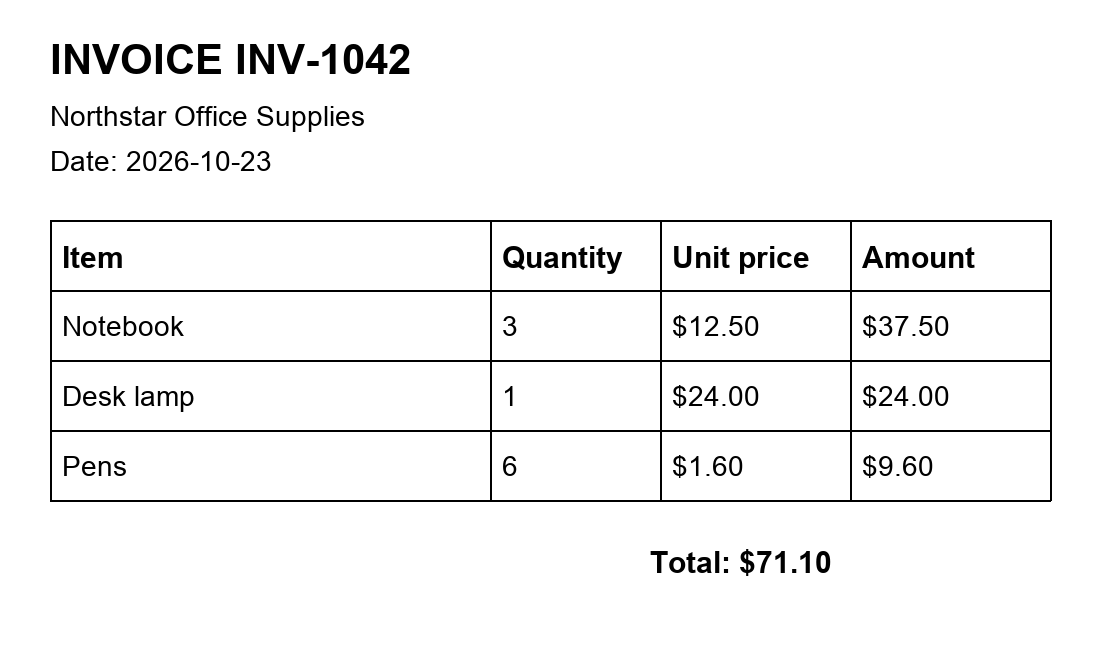
| Item | Quantity | Unit price | Amount |
|---|---|---|---|
| Notebook | 3 | $12.50 | $37.50 |
| Desk lamp | 1 | $24.00 | $24.00 |
| Pens | 6* | $1.60 | $9.60 |
Correct text and cells before downloading.
Recorded result: the quantity for Pens was blank and manually corrected to 6. English demonstration documents, not customer files. Results vary with image quality. Review the output before export.
Turn invoice line items and receipt totals into an editable spreadsheet. Check quantities, prices, discounts and totals against the image before calculating.
Convert a price-table screenshot from WhatsApp, WeChat or another chat into Excel cells. Review column alignment and correct any text clipped at the image edges.
Extract report tables for comparison and analysis. Merged cells and multi-level headers may need manual adjustments, so review the result against the source.
Use photo to Excel conversion to turn printed records into editable cells. Review dates, identifiers and decimal separators before adding the values to your workbook.
This image to Excel converter turns printed tables into editable spreadsheet cells. Use JPG to Excel for photographed records and PNG to Excel for clear digital captures. Straight, legible images give you a better starting point for review.
The downloaded XLSX stores recognized numbers, amounts and percentages as numeric cells, so you can use SUM and other calculations directly. Identifiers with leading zeros remain text. Check uncertain values, currency symbols and decimal separators before using the figures.
Use screenshot to Excel conversion for quotation tables in chats or tables in a research report. For photo to Excel conversion, avoid glare, blur and cropped columns. Complex merged headers may need correction in the image to Excel preview before you download.
Without signing in, Word, Excel and image translation share 3 free conversions per IP per day (reset at 00:00 UTC). First verified sign-in grants 5 credits once, shared with the extension. Each website conversion costs 1 credit. Failed conversions do not count; editing and downloading again are free.
Your images never leave your device. OCR runs locally in your browser; the recognized text and coordinates are sent through our server to AI for document structuring.
20 recognition languages. Opening a tool prepares your browser language and English. Choosing a page language selects that OCR language for this tab, including after refresh or opening another tool. Cached models are reused.
Yes. The Excel tool exports clear numbers, amounts and percentages as numeric cells. Review ambiguous values first. Identifiers with leading zeros remain text.
Yes, in browsers supporting WebAssembly and OffscreenCanvas. Tap to choose an image. Speed depends on your device and image size.